The control room for Whatnot sellers
Sold.
Labeled.
Packed.
A label prints the second a buyer wins. Your stream gets a live dashboard, a winner flash and a chat helper. When the show ends, every package is already sorted, weighed and ready to ship.
What you need to start
The end of a show, two ways
Before and after
What changes on the day you stop writing labels by hand.
Live demo
Watch a show happen.
This is what BidFox does on every sale, in real time.
BidFox reads your Whatnot show and catches every auction, Buy It Now and offer.
Your screen flashes the winner with a sound, and tells you if they are new or a regular.
The label is already coming out of the printer, with the buyer’s box number.
Items go straight into that buyer’s box. No sorting pile at the end.
How it works
Three steps. Then it runs itself.
BidFox works in the background while you sell.
Install and connect
Download BidFox for Mac, start the free trial and open Whatnot inside the app. Pick your thermal printer and label size, print one test label, and you are set. Settings stay with you show after show.
Go live like you always do
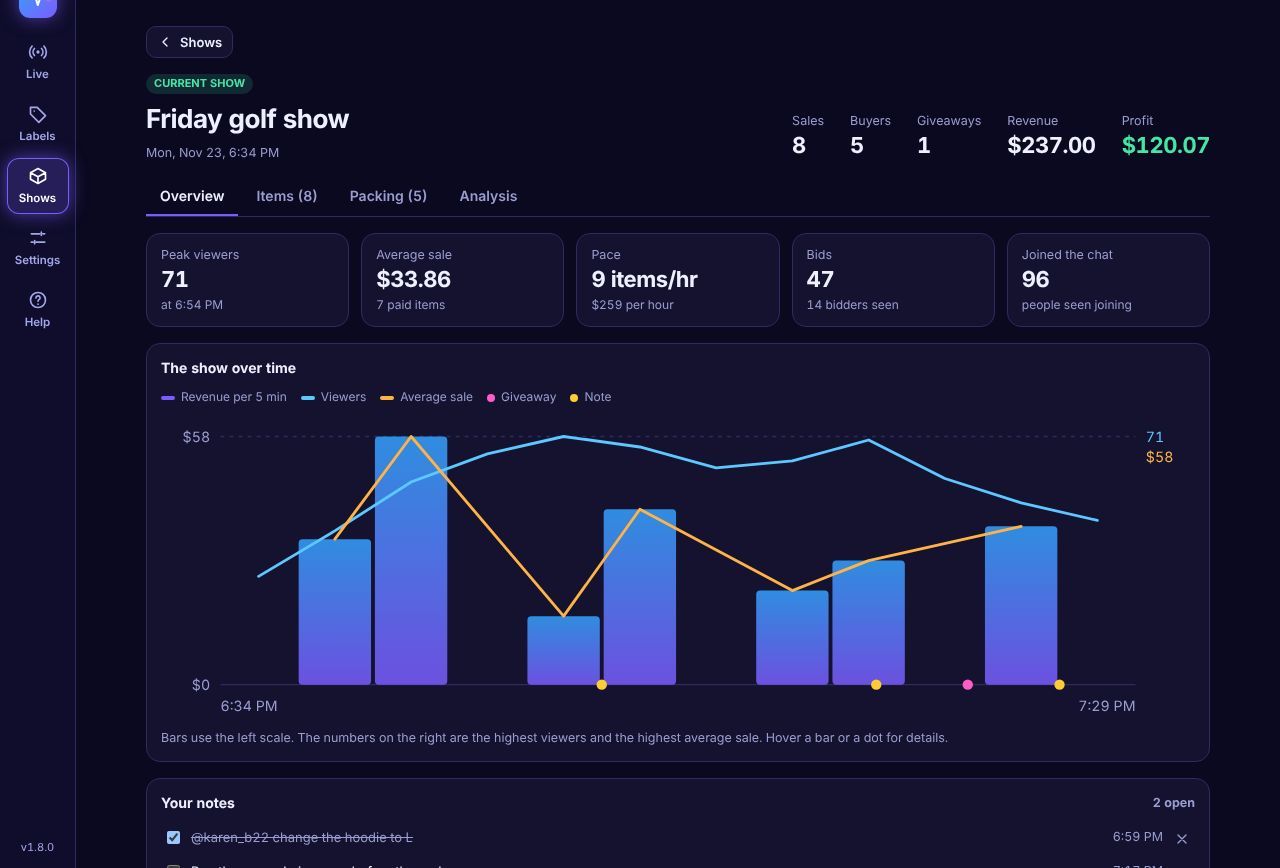
Stream from your phone or iPad. On your computer BidFox watches the same show, prints every win, flashes the winner and keeps the numbers: viewers, bids, pace and revenue against your goal.
Pack and ship
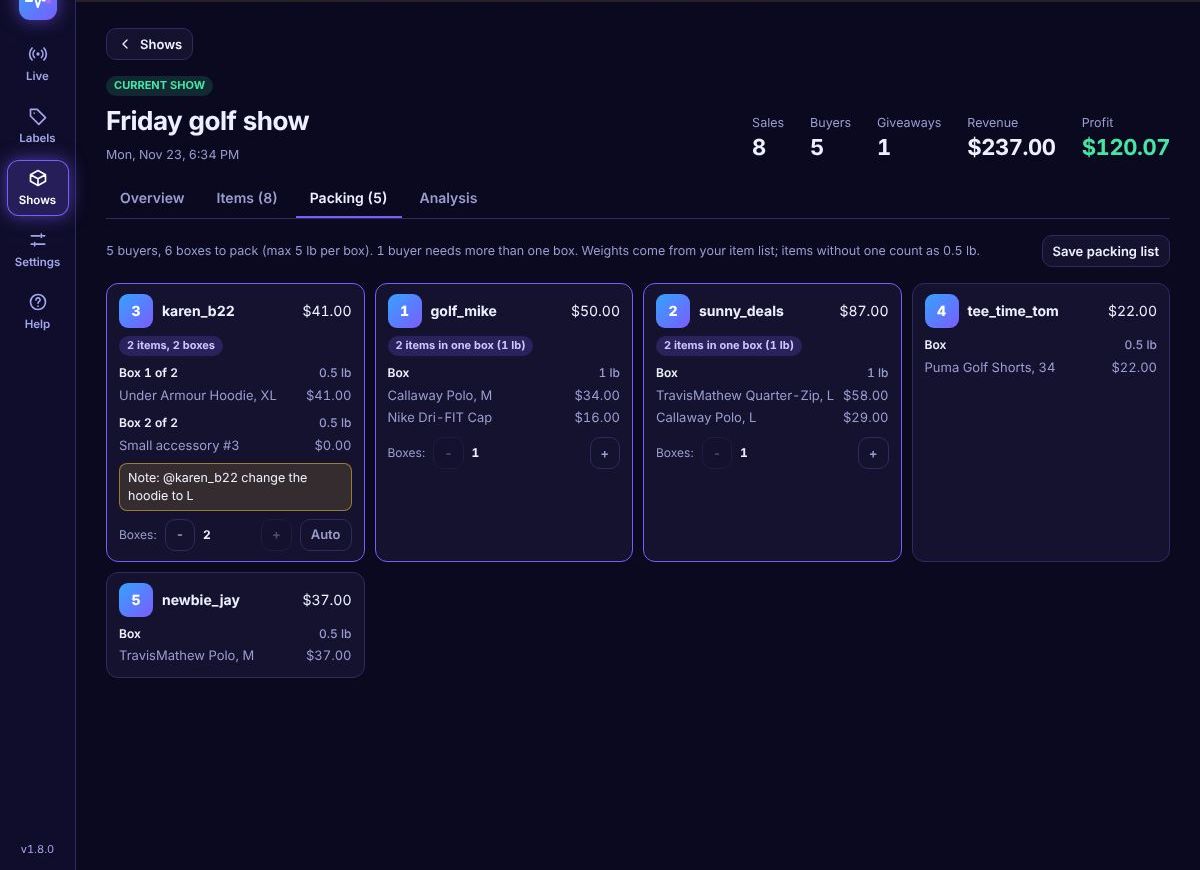
Every buyer has one number for the whole show. Match items to numbers, open the packing list and ship. Big orders are already split into boxes under Whatnot’s 5 lb bundle limit.
Mission control
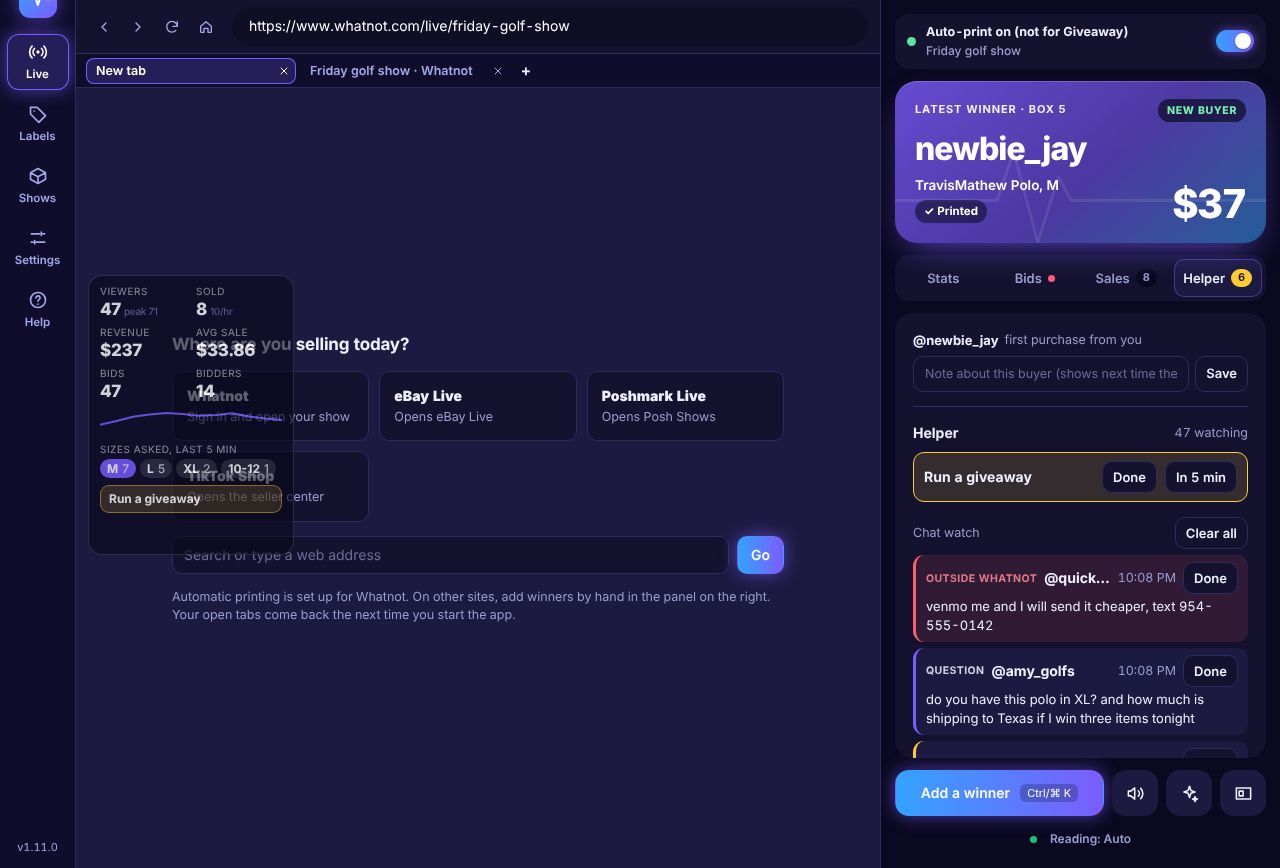
Your whole show, beside the stream.
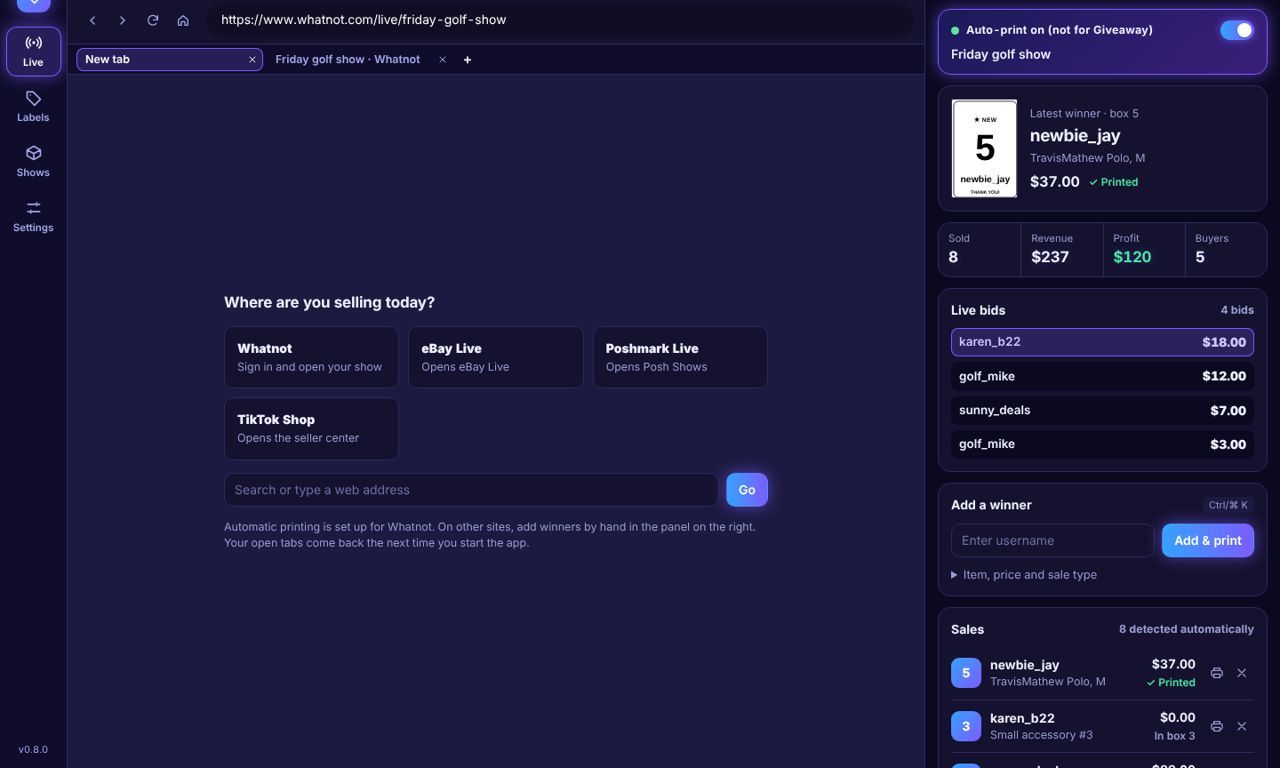
- Winner card. Big name, box number, price, and whether they are new, a regular or a top spender.
- Live bids. Every bid on the current lot as it comes in.
- Auto-print switch. Pause printing mid-show. Sales are still recorded and reprint later with one click.
- Sales, stats and helper tabs. Revenue, items per hour, average sale, peak viewers, bidders.
- Add a winner by hand. Connection hiccup? Type the name and price, the label prints as if nothing was missed.
- Waiting-labels guard. Printer jammed or out of labels? Sales wait in a queue and print together with one button.
Reprint in one click
Any sale from any show reprints, one label or the whole show.
Add a missing winner
Enter the item, buyer and price. BidFox gives the right box number.
Restart-proof
Quit by accident mid-show? Box numbers and the show continue when you reopen.
Never miss a win
A flash, a sound, and who they are.
- Winner flash. A banner or confetti across the screen for one second, four styles of sound. Every part switches off.
- Buyer card. New buyer, how much they spent with you over all shows, and the note you left last time.
- See-through overlay. Viewers, sold, revenue, average sale and sizes asked, floating over the stream where you put it.
- Reminders. “Run a giveaway” every 20 minutes. They pop up only while you are live.
Label designer
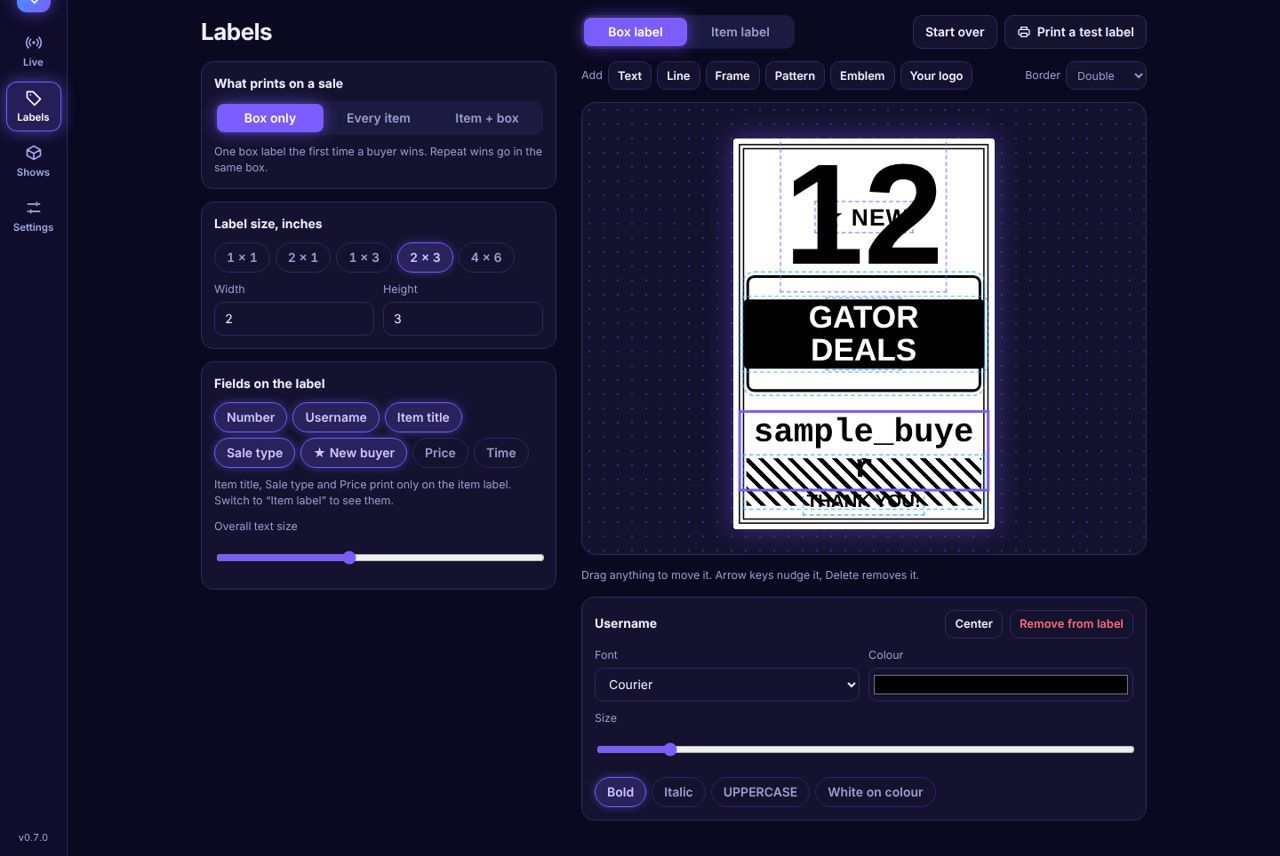
Make every label yours.
- Drag and drop. Move the number, username, item title, sale type, price and time anywhere. Arrow keys nudge.
- Your brand. Add your logo, text, lines, frames, patterns, emblems and a double border.
- Ready layouts. Big number, name first, title first or lot number, for every label size.
- Text that fits. Long usernames and titles shrink to fit, nothing is ever cut off.
- Test print. Print your draft before the show to see exactly what comes out.
Every show, remembered
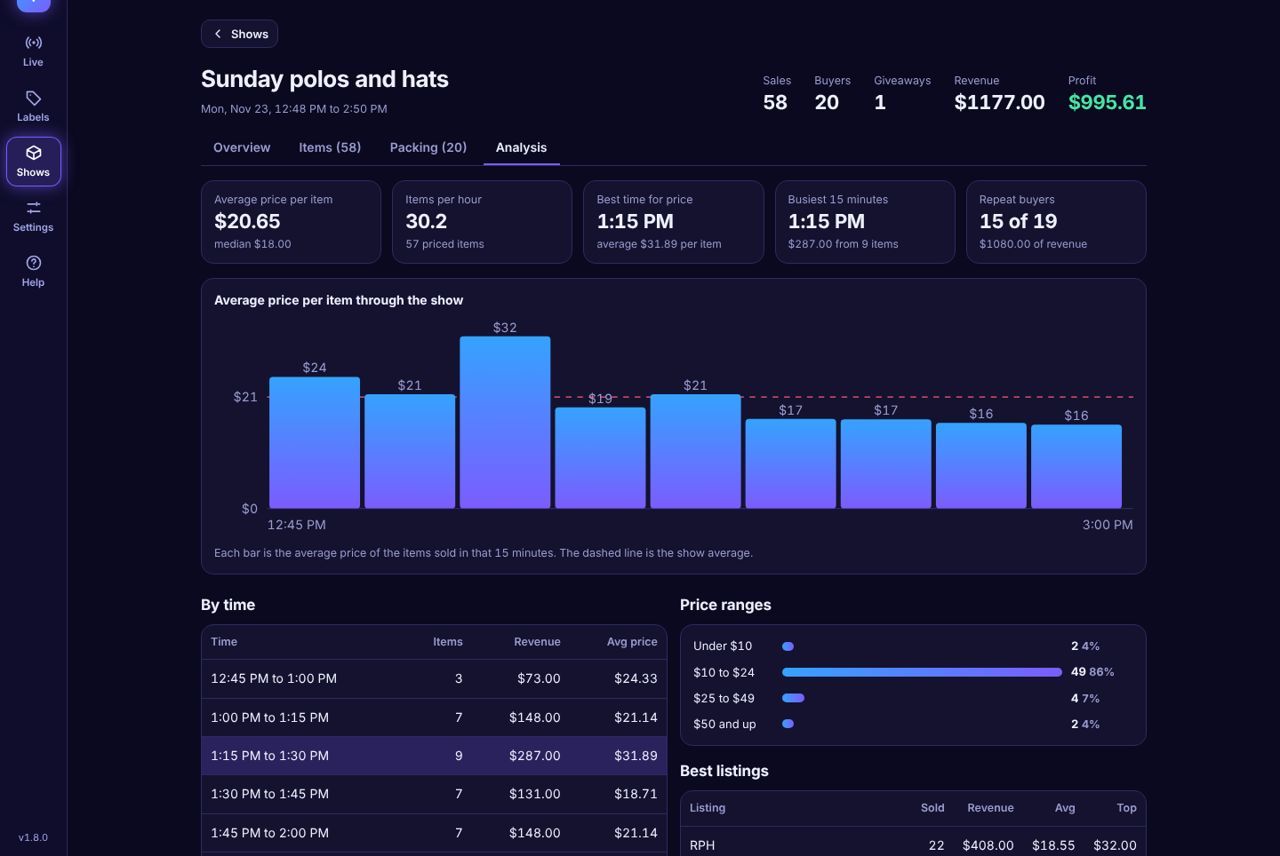
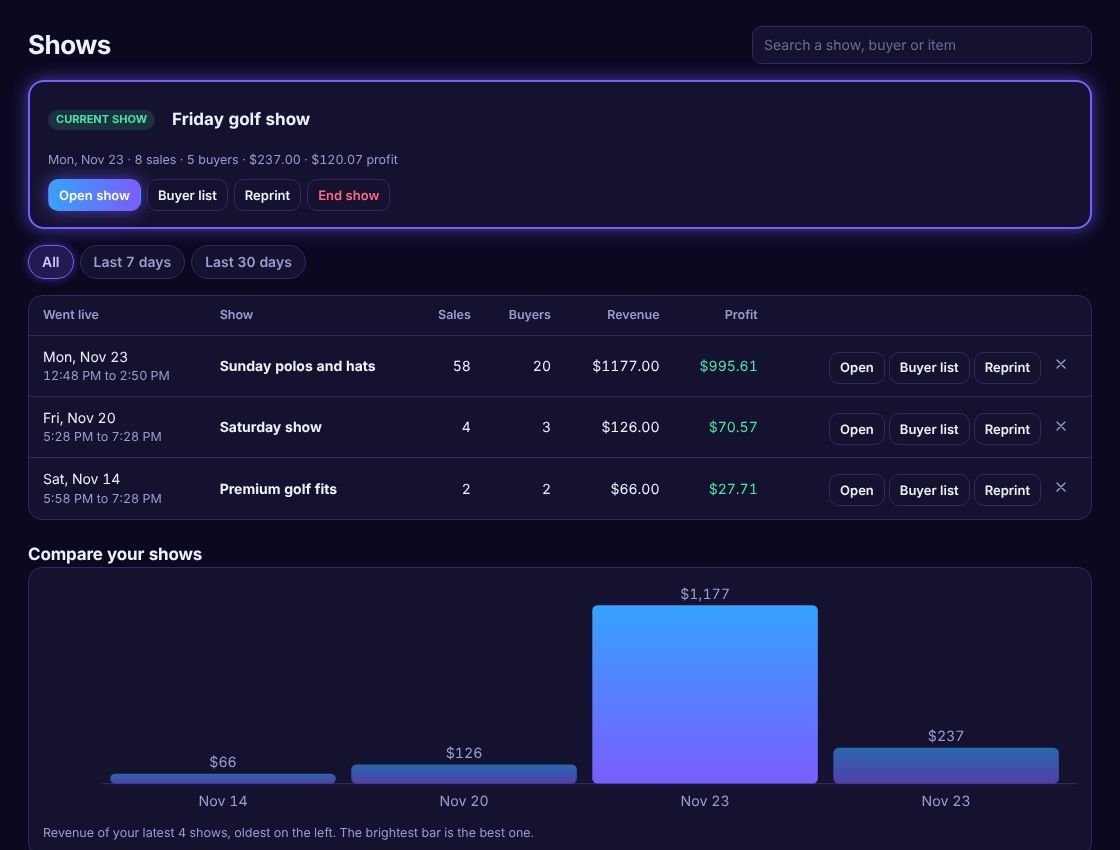
Know which shows actually sell.
- Show history. Every show saved automatically, searchable by show, buyer or item.
- Analysis. Average price through the show, best 15 minutes, best listings, price ranges, repeat buyers.
- Compare shows. Revenue, items per hour and buyers side by side.
- Win photos. A picture of the stream at each sale, kept with the show. You set the space, the oldest go first.
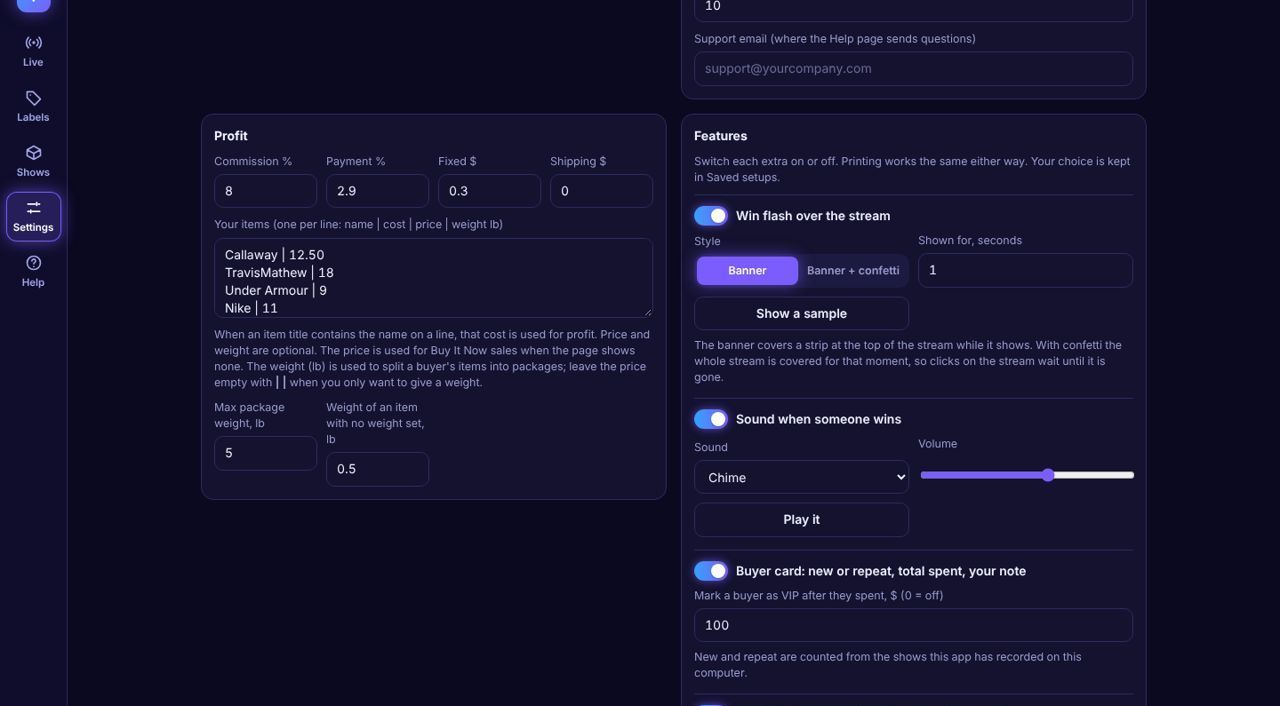
- Profit after fees. Whatnot fees, payment fees and your item costs taken out automatically.
Your shows, buyers and photos stay on your computer. Nothing is uploaded.
Only in BidFox
Things label printers never did.
The parts that make the show itself better, not just the shipping.
Buyer history from day one
Connect your Whatnot account with a read-only key and BidFox loads every past show and every buyer. A regular who bought from you three months ago is recognised on the very first show.
Chat watch
While you talk, BidFox reads the chat and points out what needs you: someone offering a deal off Whatnot, a link or phone number, a question you missed, spam. Quick replies copy with one click.
Every kind of sale, covered
Auctions are just the start.
Each sale type has its own switch. A sale you skip is still recorded.
Auction wins
Print the moment the timer ends, with the buyer’s box number.
Buy It Now
Print with a BUY IT NOW badge; the price comes from your item list.
Accepted offers
Offers you accept print like any sale, badged OFFER.
Giveaways
Logged with the winner. Print the label or skip it, your choice.
Payment failed
A PAYMENT FAILED label so you pull the item before shipping.
Raids
A label with the raider’s name so you can thank them on air.
Works with your thermal printer
BidFox prints through your computer’s own print system, so any printer your Mac can see works. Use a second printer just for box labels if you like.
Every common label size
Or type your own width and height.
Three print modes
Choose how labels print.
Switch any time, even between shows.
Every item
An item label on every sale: username, item title and sale type. Best when you tag each piece.
Box only
One big box label the first time a buyer wins. Every later win goes into the same box. No sorting.
Item + box
Both at once: an item label with the box number on every sale, plus the box label on the first win.
Built for live sellers
Everything in one app.
Fifteen things BidFox does so you can just sell.
Instant label printing
Labels print automatically the second a sale is detected.
Sequential box numbers
Each buyer gets one number for the whole show.
Repeat buyer detection
Knows who bought before, in this show and in past ones.
Skip by word or price
Rules skip filler listings or items under a price you set.
Win photos
A snapshot of the stream at every sale, kept with the show.
Two printers
Box labels to one printer, item labels to another.
Test print
Send a sample through the exact print path before you go live.
Waiting-labels queue
Nothing is lost when the printer is off. Print all pending in one click.
Live pace and goal
Average price, items per hour and progress to your revenue goal.
5 lb box splitting
Packing list splits big orders to fit Whatnot’s bundle limit.
Show notes
Type “@buyer wants L” mid-show, get a to-do list at the end.
Reminders
Giveaways, follows, breaks, on your own timer.
Reads only your shows
Watching another seller? Nothing is recorded or printed.
Themes and your logo
Seven color themes, your own name and logo in the app.
PDF and CSV reports
Show summary, buyer list, packing and pick lists.
Platforms
Made for Whatnot first.
Whatnot is fully automatic. Other live platforms open in their own tab and you add winners in two seconds; automatic support is on the way.
Pricing
One price. Everything included.
No per-label fees, no feature tiers.
- Unlimited labels and shows
- Every feature, every update
- Whatnot buyer history
- Email support
- Unlimited labels and shows
- Every feature, every update
- Whatnot buyer history
- Email support
- Unlimited labels and shows
- Every feature, every update
- Whatnot buyer history
- Email support
- Priority help with setup
14-day free trial on every plan. No card needed to try.
FAQ
Questions, answered.
How does BidFox know when someone wins?
You open Whatnot inside BidFox and sign in as usual. It reads your own show the way you see it and catches auction wins, Buy It Now, accepted offers and giveaways. Nothing extra to set up.
Do I need my phone and my computer?
Most sellers stream from a phone or iPad as usual and keep BidFox open on the computer next to them for labels and the dashboard.
Which printers work?
Any printer your computer can print to. A USB thermal printer such as Polono, Rollo, Munbyn or Zebra works best. Removable labels peel off cleanly.
What label sizes can I use?
1×1, 2×1, 1×3, 2×3 and 4×6 inches, or any width and height you type. Each size has ready layouts.
Does it work on Mac and Windows?
Mac (macOS 12 or later, Intel and Apple Silicon) is fully supported. Windows 10 and 11 are in beta.
How fast is setup?
About five minutes: install, pick the printer and label size, print a test label, go live.
What is the Whatnot connection?
An optional read-only key from Whatnot’s official Seller API. It loads your past shows and buyers so repeat buyers are recognised from day one. BidFox never changes anything on your Whatnot account.
Does BidFox post in my chat or ban people?
No. Chat watch only reads and points things out to you. You and your mods stay in charge.
Where is my data kept?
On your computer: shows, buyers, notes and win photos. The Whatnot key is stored locked in your system keychain.
What if my printer jams mid-show?
Sales keep recording and wait in a queue. When the printer is back, one button prints everything that was waiting.
Can I cancel anytime?
Yes. Cancel in one click and you will not be charged again.
Ready to skip the sorting pile?
Sell faster, pack faster, and know which shows are worth your evening.